
Event Message
Camel supports the Event Message from the EIP patterns by supporting the Exchange Pattern on a Message which can be set to InOnly to indicate a oneway event message. Camel Components then implement this pattern using the underlying transport or protocols.
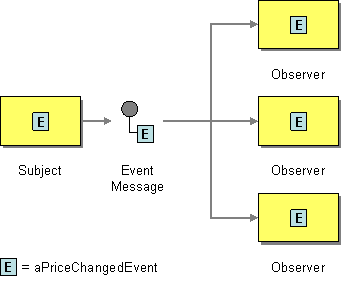
The default behaviour of many Components is InOnly such as for JMS, File or SEDA
| Tip | ||
|---|---|---|
| ||
See the related Request Reply message. |
Explicitly specifying InOnly
If you are using a component which defaults to InOut you can override the Exchange Pattern for an endpoint using the pattern property.
| Code Block |
|---|
foo:bar?exchangePattern=InOnly |
From 2.0 onwards on Camel you can specify the Exchange Pattern using the DSL.
Using the Fluent Builders
| Code Block |
|---|
from("mq:someQueue").
  setExchangePattern(ExchangePattern.InOnly).
  bean(Foo.class);
|
or you can invoke an endpoint with an explicit pattern
| Code Block |
|---|
from("mq:someQueue").
  inOnly("mq:anotherQueue");
|
Using the Spring XML Extensions
| Code Block |
|---|
<route>
    <from uri="mq:someQueue"/>
    <inOnly uri="bean:foo"/>
</route>
|
| Code Block |
|---|
<route>
    <from uri="mq:someQueue"/>
    <inOnly uri="mq:anotherQueue"/>
</route>
|
| Include Page | ||||
|---|---|---|---|---|
|