
Available as of Camel 2.14
The barcode data format is based on the zxing library. The goal of this component is to create a barcode image from a String (marshal) and a String from a barcode image (unmarshal). You're free to use all features that zxing offers.
Dependencies
To use the barcode data format in your camel routes you need to add the a dependency on camel-barcode which implements this data format.
If you use maven you could just add the following to your pom.xml, substituting the version number for the latest & greatest release (see the download page for the latest versions).
<dependency>
  <groupId>org.apache.camel</groupId>
  <artifactId>camel-barcode</artifactId>
  <version>x.x.x</version>
</dependency>
Using the Java DSL
First you have to initialize the barcode data fomat class. You can use the default constructor, or one of parameterized (see JavaDoc). The default values are:
| Parameter | Default Value |
|---|---|
| image type (BarcodeImageType) | PNG |
| width | 100 px |
| height | 100 px |
| encoding | UTF-8 |
| barcode format (BarcodeFormat) | QR-Code |
// QR-Code default
DataFormat code = new BarcodeDataFormat();
If you want to use zxing hints, you can use the 'addToHintMap' method of your BarcodeDataFormat instance:
code.addToHintMap(DecodeHintType.TRY_HARDER, Boolean.true);
For possible hints, please consult the xzing documentation.
Marshalling
from("direct://code")
  .marshal(code)
  .to("file://barcode_out");
You can call the route from a test class with:
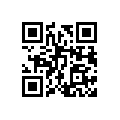
template.sendBody("direct://code", "This is a testmessage!");
You should find inside the 'barcode_out' folder this image:
Unmarshalling
The unmarshaller is generic. For unmarshalling you can use any BarcodeDataFormat instance. If you've two instances, one for (generating) QR-Code and one for PDF417, it doesn't matter which one will be used.
from("file://barcode_in?noop=true")
  .unmarshal(code) // for unmarshalling, the instance doesn't matter
  .to("mock:out");
If you'll paste the QR-Code image above into the 'barcode_in' folder, you should find 'This is a testmessage!' inside the mock. You can find the barcode data format as header variable:
| Name | Type | Description |
|---|---|---|
BarcodeFormat | String | Value of com.google.zxing.BarcodeFormat. |