


Geronimo管理コンソールの左側の Console Navigation メニューの Security Realms ポートレットを使用して、セキュリティ・レルムを管理できます。このポートレットで新たなセキュリティ・レルムを追加したり既存のレルムを編集できます。レルムを除去するには通常はDeployerツールのコマンド行オプションを使用して行います。
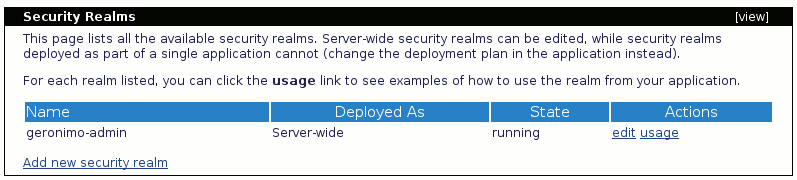
このポートレットにはすべての利用可能なセキュリティ・レルムがリストされます。デフォルトでは、プロパティ・ファイルを使ってユーザーを認証するために使用されるGeronimoのレルムは geronimo-admin です。
既存のレルム(この場合にはgeronimo-adminです)を編集する際には以下のような画面が表示されます。realm nameやlogin domain nameは変更できない点にご注意ください。
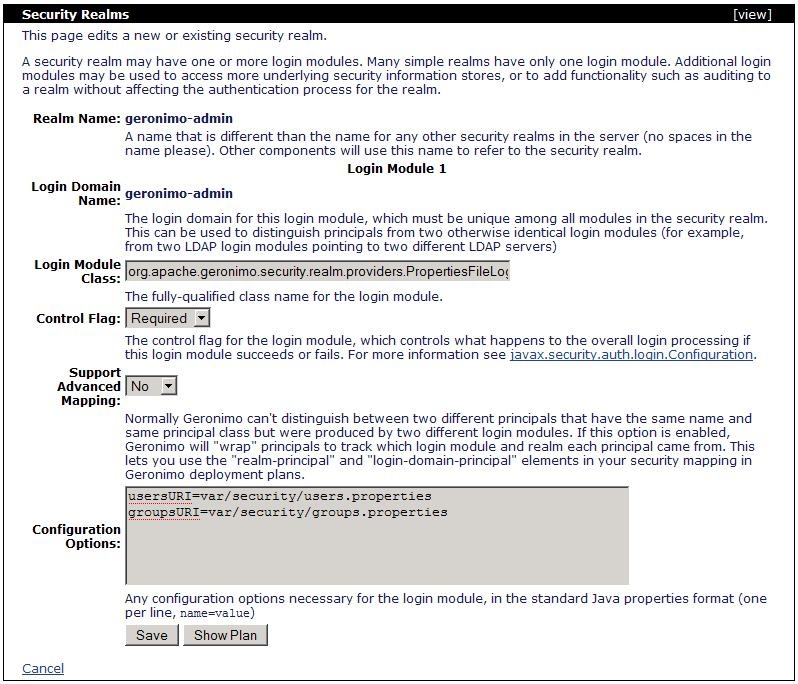
以下の例はこのレルムによって生成されたデプロイメント・プランを示しています。
geronimo-properties-realm
<module xmlns="http://geronimo.apache.org/xml/ns/deployment-1.2">
    <environment>
        <moduleId>
            <groupId>console.realm</groupId>
            <artifactId>geronimo-admin</artifactId>
            <version>1.0</version>
            <type>car</type>
        </moduleId>
        <dependencies>
            <dependency>
                <groupId>org.apache.geronimo.configs</groupId>
                <artifactId>j2ee-security</artifactId>
                <type>car</type>
            </dependency>
        </dependencies>
    </environment>
    <gbean name="geronimo-admin" class="org.apache.geronimo.security.realm.GenericSecurityRealm" xsi:type="dep:gbeanType"
           xmlns:dep="http://geronimo.apache.org/xml/ns/deployment-1.2" xmlns:xsi="http://www.w3.org/2001/XMLSchema-instance">
        <attribute name="realmName">geronimo-admin</attribute>
        <reference name="ServerInfo">
            <name>ServerInfo</name>
        </reference>
        <xml-reference name="LoginModuleConfiguration">
            <log:login-config xmlns:log="http://geronimo.apache.org/xml/ns/loginconfig-2.0">
                <log:login-module control-flag="REQUIRED" wrap-principals="false">
                    <log:login-domain-name>geronimo-admin</log:login-domain-name>
                    <log:login-module-class>
                            org.apache.geronimo.security.realm.providers.PropertiesFileLoginModule
                    </log:login-module-class>
                    <log:option name="usersURI">var/security/users.properties</log:option>
                    <log:option name="groupsURI">var/security/groups.properties</log:option>
                </log:login-module>
            </log:login-config>
        </xml-reference>
    </gbean>
</module>
前述のとおり、これはデフォルトのプランで、プロパティ・ファイルを使用したセキュリティ・レルムです。新たにレルムを作成する際は以下の利用可能なレルムの種類から選択する必要があります。:
- Certificate Properties File Realm
- Database (SQL) Realm
- LDAP Realm
- Properties File Realm
- Other
最後のオプションは、貴方の環境がいずれにも当てはまらない場合にカスタマイズしたレルムを作成するためのものです。
デフォルトの Properties File Real について説明したので、以降はその他の選択肢について説明します。